

For the longest time, documentation in design systems work was the part that overwhelmed me. I was building foundations in Figma, components, token architecture, spacing rules and the system was growing. But every non-obvious call I made lived in my head. I’ll write it all up when things settle, I used to tell myself.
Things don’t settle. The system just keeps growing, and the gap between what’s in your head and what’s written down keeps widening.
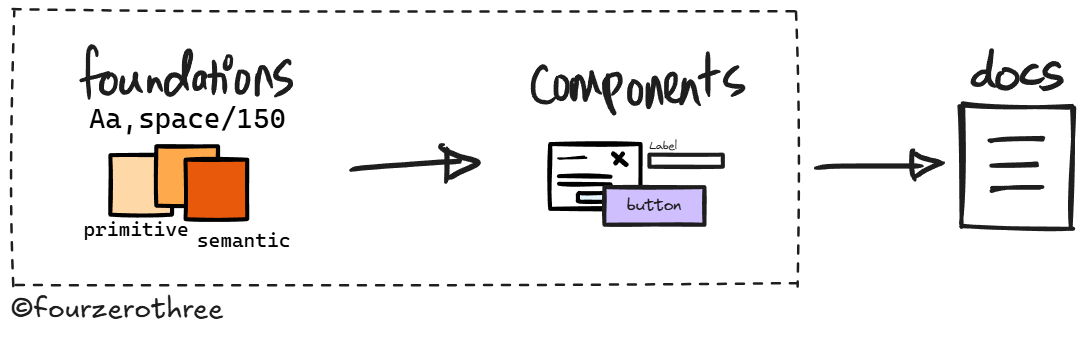
That’s where documentation actually matters. When I started using AI (Claude chat) to help write the docs, 2 things happened.
Documentation stops being a separate job.
Bringing Claude in at decision time, iterating on a token name, rationalising a spacing rule, capturing a component decision as it happens - means you're documenting as you build, not after. The overwhelm disappears because you start treating it as a continuous output of the thinking you’re already doing.The documents you’re producing aren’t just for design system documentation. They become the “context layer” that keeps your system coherent.
Every canonical doc, every micro-decision logged, every motion call captured, is fed back into Claude continuously as the system is being built. By the time you’re building components in code, the AI isn’t starting cold. It knows the token vocabulary because it helped build it. It knows why the disabled state fails contrast. The system doesn’t drift because the reasoning behind it is always in context.
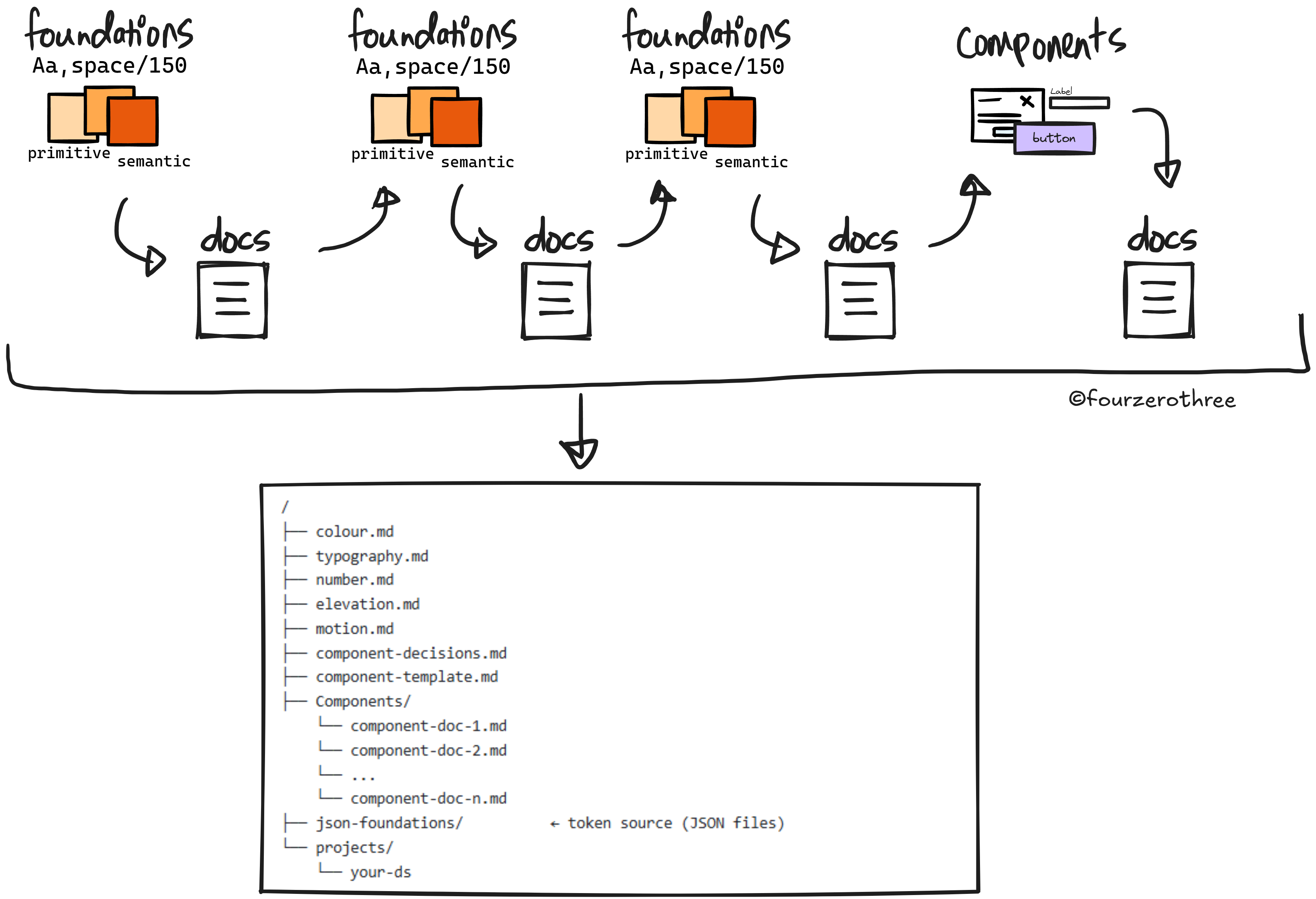
Building context first wasn’t new to me - I’d been doing it with prototypes for a while. When I started design system work (with AI), the instinct carried over naturally. TJ Pitre at Southleft gave this a proper name - Context-Based Design Systems. I've watched a lot of his work and it's quietly shaped how I think about building design systems with AI.
AI should know how you think about your design system
The first thing I do when starting a design system is set up a Claude Project (in Claude chat). I feed it two things before anything else: instructions to act as my Design System (DS) co-pilot, and a set of skills .md files that tell it how to handle design system work and DS documentation specifically.
Most of what I do with the Design Systems Project is brainstorming and iterating decisions with Claude, for example - why is this token named this way, why does this semantic category exist, what’s the exception and why. By the time I start building components, Claude knows the vocabulary because it helped shape it.
One thing that accelerated this for me was, I had already written extensively about foundations and token architecture in my Design System Chronicles series. I handed those articles directly to Claude. They gave Claude a deep understanding of how and why I’d architected things the way I had, without me having to re-explain from scratch.
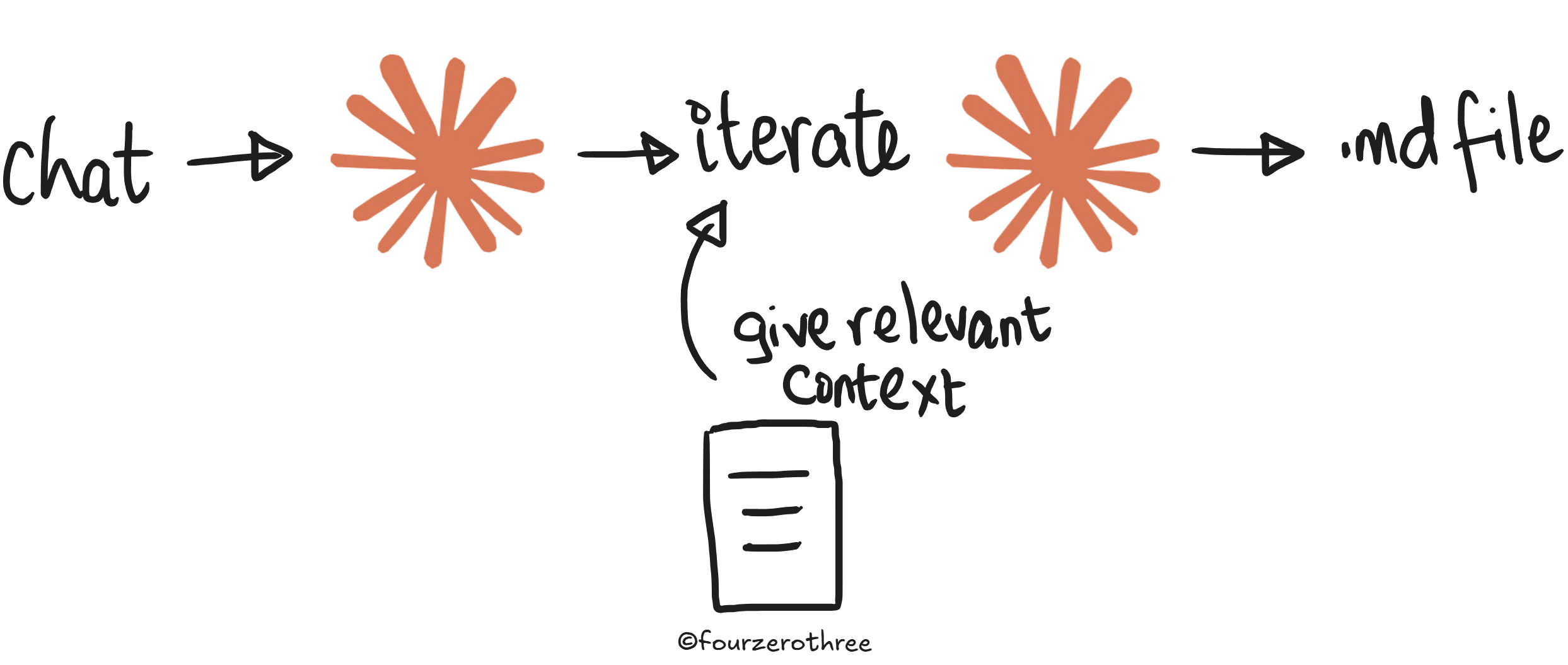
If you have something similar, use it. If you don’t, you can do the same thing with reference material from design systems you admire. Study how they’ve structured their token architecture, adapt it to your organisation and your system, and feed that thinking into Claude as your foundation. The goal is the same - Claude needs to understand not just what your system looks like, but how you think about it.
Foundations first - canonical docs
The three core foundations of any design system are colour, typography, and numbers. Each one runs on the same underlying logic - a two-layer token model → primitives that define the raw values, semantics that map those values to meaning and intent.
Now, for every foundation, I produce two types of files and the distinction matters.
The first is the canonical docs (all docs are .md files). This covers the
token architecture - how the primitives and semantic tokens are structured, how they map to each other and
the system model - which is where the reasoning lives. The rules, the whys, the exceptions, the decisions that weren’t obvious. These aren’t notes. They’re authored, structured, source-of-truth documentation written with Claude during the creation of tokens and decision making, not after. The doc is the output of the thinking behind it.
The second is the JSON export - all variables out of Figma, exported via a Figma plugin and fed straight into the Claude Project. This is the data layer.
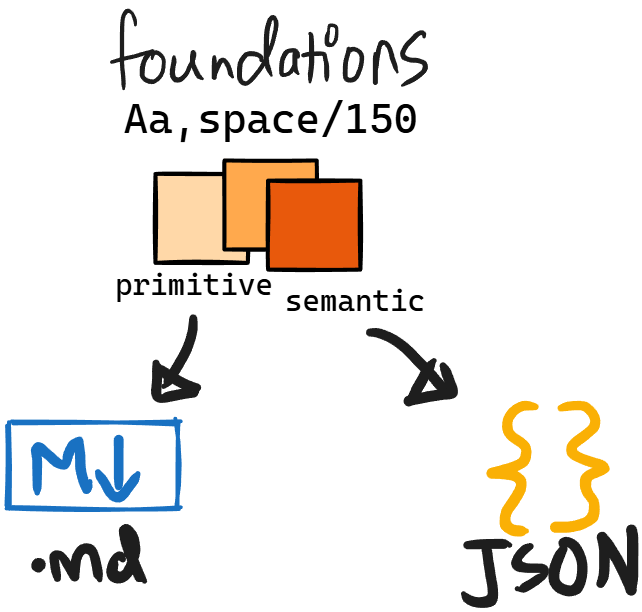
The canonical docs give Claude the logic. The JSON gives it the values. Both matter, and both live in the Project from the moment a foundation is done.
The reason to be disciplined about this isn’t just organisational tidiness or that it serves as my documentation in Figma. It’s that every one of these files is context for Claude as you’re building in Figma, and later for Cursor when you’re building in code. It’s what stops Cursor (later) from violating the intent behind tokens and any other type of drift.
Elevation
Elevation doesn't get this treatment upfront. Elevation values make sense against real component surfaces. You can't reason your way to the right shadow in the abstract. So I defer it entirely. Build a few components first, place them in real layouts, evaluate elevation visually against them. A doc after this is enough.
Motion
Motion gets the same deferred treatment - for the same reason. You can't evaluate a transition in the abstract.
What I do → vibe code a simple motion prototype app with controls - duration, easing, a replay button and vibe code my components into it (components need not be perfect, they are just artifacts to test motion). I then use these controls to test if a motion feels right for each component (that may need motion).
The output is a motion table - which components need motion, which values, which don't require them - and from that, a motion.md that captures the tokens and the reasoning behind each call. That goes into the Claude Project.
What we’ve got
At the end the Project has canonical docs for foundations
colour.md(Note - you could either combine all your docs into one, or have them as separate docs - for example,colour-token-architecture.mdandcolour-system-model.mdand so on. This applies to all your foundations.)typography.mdnumbers.mdelevation.mdmotion.md
and their JSON files. Every foundation is accounted for, and all of it is context for AI.
Building components and logging decisions as you go
While building components in Figma, maintain a decisions record, you could call it component-decisions.md.
Now, this is different from the canonical foundation docs. Canonical docs are authored and structured and they're meant to be read. The decisions record is freeform and continuous. It's a running log of every non-obvious call made during the component build (in Figma), captured as the thinking happens.
Think of things like:
Button scale - Small 32px, Large 40px. 48px deferred, no confirmed use case yet.
Chip - Uses
spacing/150(12px) padding on both ends. When the dismiss icon button (24px hit target) is present, the invisible 4px padding within the icon button frame creates a visual discrepancy at the trailing end in Figma. This should not exist in code.
Three things it does:
It keeps you honest about decisions you've already made so you don't accidentally override them later.
It helps you remember the why behind calls.
And it becomes part of the context stack that everything downstream draws from, including component documentation.
These are exactly what produces reasoned outputs later.
Now, before documenting a single component, do one more piece of work with Claude: research and brainstorm a component documentation template. What sections should every component doc have? What's always present, what's conditional? That way your documentation output stay consistent.
You could point to several real design systems, use them as a reference and build a template that fits your system. A good template could include the following: Overview, Anatomy, Props, States & Variants, Behaviour & Interactions, Usage, Accessibility, and Token Callouts.
The template goes into the Claude Project. When it's time to document, Claude has the template.
Now you have
Foundations canonical docs
component-decisions.mdcomponent-template.md
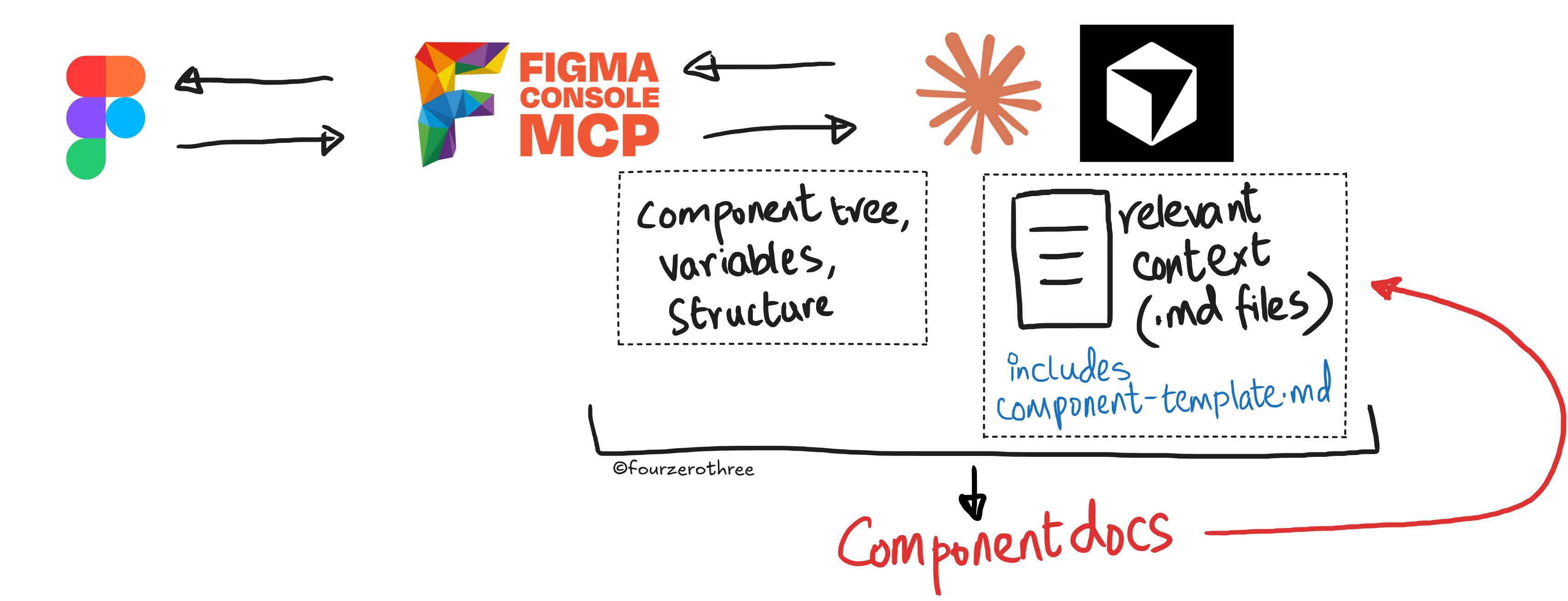
For component documentation, I connect Figma to Claude or Cursor (if Cursor has all context) via the Figma Console MCP. I pass the component node and the component documentation template. At that point two things are in context simultaneously:
the Figma node - full component tree, bound variables, variant structure, exact measurements and
everything accumulated in the foundation docs, and the decisions record.
The output reflects that. “Token Callouts” don’t just list which token is used but explain why that token and not another. The reasoning behind a deliberate accessibility exception isn’t missing or vague, it’s there because it was logged when the decision was made.
The Figma Console MCP gives Claude ground truth from the file. The accumulated context gives it the system thinking. Together they produce documentation that a designer, an engineer, and Cursor can all read and actually use.
Quite honestly, you'll still need to review and correct and that's not going away. But where you get at with the final component documentation is really good.
In fact this output becomes a {component-name}.md that can serve as a component spec and supplement the Figma Console MCP when you code (and do Storybook) the component. With so much context established, there is minimal drift.
What you've actually built
This is what building context-first actually means. A continuous accumulation of decisions and reasoning that runs parallel to the design work, so that when AI enters the loop at any point, it isn't starting cold.
Every canonical doc, every JSON export, every component .md file - this entire context stack gets fed to Cursor when it's time to build in code. Cursor isn't guessing at your token vocabulary or second-guessing your spacing rules.
/
├── colour.md
├── typography.md
├── number.md
├── elevation.md
├── motion.md
├── component-decisions.md
├── component-template.md
├── Components/
    └── component-doc-1.md
    └── component-doc-2.md
    └── ...
    └── component-doc-n.md
├── json-foundations/
    └── colour-primitive.json
    └── colour-semantic.json
    └── ...(the rest of it)
└── projects/
    └── your-ds
The system doesn’t drift because the reasoning behind it is always in context - in Claude, and then in Cursor. A design system built this way stays coherent, because the thinking behind it was never lost.
💡Note:
You are also doing yourself a favour by making it easy for AI tools like Cursor. When the context is already there, you dont need premium models to do the work for you. Even Auto mode or Composer-2 handle it very well - which saves you real money!