

Design workflows are shifting fast enough that the ground keeps moving under your feet. The question we keep hearing a lot in the industry currently is whether Figma still belongs in the loop at all. Design in Figma, then translate to code with MCP, or skip straight to prototyping high fidelity designs?
Honestly, the answer still depends on your org and your workflow. For most teams right now, high-fidelity in Figma and translating that with MCP is the most reliable path. The design record exists, the handoff is clean, engineers have something to work from.
But tools like Cursor and Claude Code are making direct prototyping genuinely viable in a way they weren't a year ago. I've been running this as an ongoing experiment: skipping Figma for certain parts of the process, prototyping directly in Cursor, seeing what holds and what breaks. There are caveats. But the direction feels right.
Sometimes work just demands you ship screens fast. And the idea of going through a full Figma mocks-to-handoff cycle is starting to feel like a shaky bridge, especially as more teams lean into direct high-fidelity prototyping for handoff.
Figma itself is pushing this direction. Dylan Field called "design vs code" a false dichotomy, describing Figma's goal as freeform design, prototyping with code, and shipping to production, all in one platform.


The direction I'm moving in: most of the actual work happens in Cursor, with Figma reserved for the design system setup and quick design iterations when needed. Use Figma as foundation and Cursor as the place you build.
But skipping Figma only works if you have something anchoring the output. Here's what that looks like.
Stage one: when the DS isn't ready yet
A lot of designers are in this position: building the design system as they go, or working on a product that simply doesn’t have one yet. And if that’s where you are, asking an AI tool to produce something handoff-ready doesn't really work. There’s no design system for the tool to reference. No tokens, no component language, nothing to anchor the output to.

The typical workaround: use something like Google AI Studio, v0 or Figma Make with a rough, lightweight set of styles to create quick mocks for brainstorming and alignment. Then go back to Figma, do the proper high-fidelity design, build out the design system in parallel, and eventually hand off to engineers. It works. It’s also slow, and it asks you to do the design work twice.
What I’ve found is foundations in code are what make the AI tool reliable. When your tokens are properly mapped as Figma variables with documentation, they can be translated directly into the playground and that’s the anchor. You don’t need a full DS to get there.
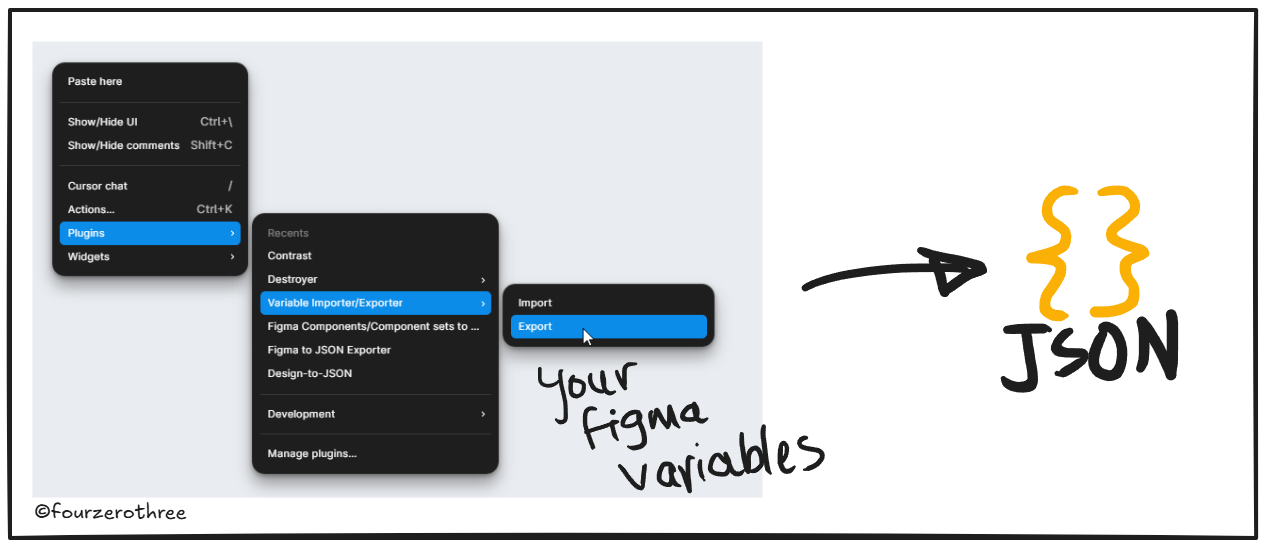
You may not have a design system fully established and that’s fine. The hack is - get the foundations in first, colours, spacing, typography in Figma, with proper variable documentation.
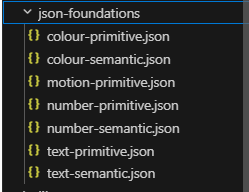
Maybe you have some components built in Figma with the right tokens and component props. Maybe you have none. Either way is fine. The point is to not wait until the DS is complete before you start. Get what you have into code and build from there.
The idea behind the playground itself is simple: a Cursor repo you always return to, not a fresh project every time. Because the alternative — feeding context, a lightweight design system, and product details into a new session each time is what produces inconsistent output.
I'd recommend a Next.js setup. The reason is shadcn, which I'll get to in a bit. But the broader reason is that this stack gives you control over how tokens flow through the system.
Setting up the playground in Cursor
Here's an example stack you could use:
Framework: Next.js
Styling: Tailwind CSS + SCSS token files (SCSS built from your foundation tokens and documentation in Cursor)
Components: shadcn/ui, with tokens remapped to
--ds-* (your DS tokens)custom propertiesShowcase: a running inventory of all components, colours, typography, and spacing in the prototype, for engineer reference during handoff
On the shadcn choice
Primary reason is you may not have your components built in your DS. Secondly, shadcn isn't a component library you install as a dependency. It's a collection of components you copy into your own repo and own outright. That matters here because Cursor can read and edit the source directly. The components are built on Radix UI, so focus management, keyboard handling, and ARIA are already handled. You're not starting from zero, and you're not inheriting someone else's opinions about colour and spacing.
💡One more thing: If you have a few components built in Figma, build them in the playground using shadcn as the base. Use the Figma/Figma Console MCP to extract the structure, token usage, layout, and component API, then instruct Cursor to build the component with shadcn with your tokens. If a component doesn't exist in Figma yet, use shadcn directly.
Prompt:
“Lets create the [name of component] component
Here is the node url for it → [node url].Use Figma console mcp to extract data (layout, structure, hierarchy, tokens, component API etc) of the component, but use shadcn to build it.”
The point is to stay on one substrate throughout. A few custom components and shadcn for the rest means two different component behaviors to manage. Just use shadcn for everything, remapped to your tokens.
Remember:
The shadcn component API and your DS’s component API are not the same thing. What Cursor produces is visually accurate and token-correct, but behaviourally it’s shadcn. Use it for what it’s good at: aligning on visual language, flows, and token usage. Don’t treat it as a spec for how the component should behave in production.
The token layer
Your tokens can't just live in Figma. They need to exist as files the playground can actually consume. For example:
_primitives.scss   →  raw values: hex, px, radius numbers
_semantic.scss     →  intent-mapped aliases: --mds-surface-primary, --mds-text-subtle
globals.css        →  consumed by Tailwind via CSS custom properties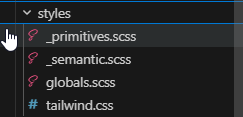
Once this exists in the repo, Cursor stops inventing colour values. It uses your token values. That alone closes a significant part of the slop problem.
One thing worth being explicit about: Cursor knows your token rules because you tell it, in writing with agents.md or project/design-system rules (your call). You could in addition also maintain a folder with the design system foundations - naming conventions, rules for how semantic tokens map to primitives, component constraints, spacing scale logic.
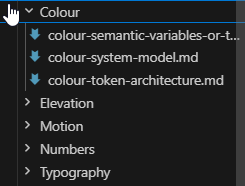
Without it, the token files exist but the model doesn't know how they're supposed to be used.
Building screens and managing drift
For components, if they exist in Figma, use the Figma MCP/Figma console MCP to extract their structure, token usage, layout, and prop API, then feed that to Cursor, which extends the shadcn component remapped to your tokens.
Once the playground is set up, you start building the actual module screens in Cursor. This is where ad hoc components come in fast - components that don't exist in Figma, built on the fly as the screen demands them. Because Cursor has context of your tokens and the rules of how they're applied, it does a genuinely good job — mostly right on token application for most components. They start to look like your product's components, even though none of them formally exist in your DS yet.
You still have to check the work
You need to be the human in the loop. Shadcn defaults can sometimes override your token rules. You'll get rogue hardcoded values in unexpected places. Check the output, don't just accept it.
One thing you could do to avoid this is to ask Cursor to build an anti-drift detection script - something that scans the codebase at the end of a screen build and flags any hardcoded values, non-token colours, or spacing that's outside your defined scale. Token drift is silent. Without something actively scanning for it, it accumulates fast.
A design system “Showcase”
Alongside the prototype screens, I maintain a showcase: a living inventory of every component, colour, typography style, and spacing value in the playground.
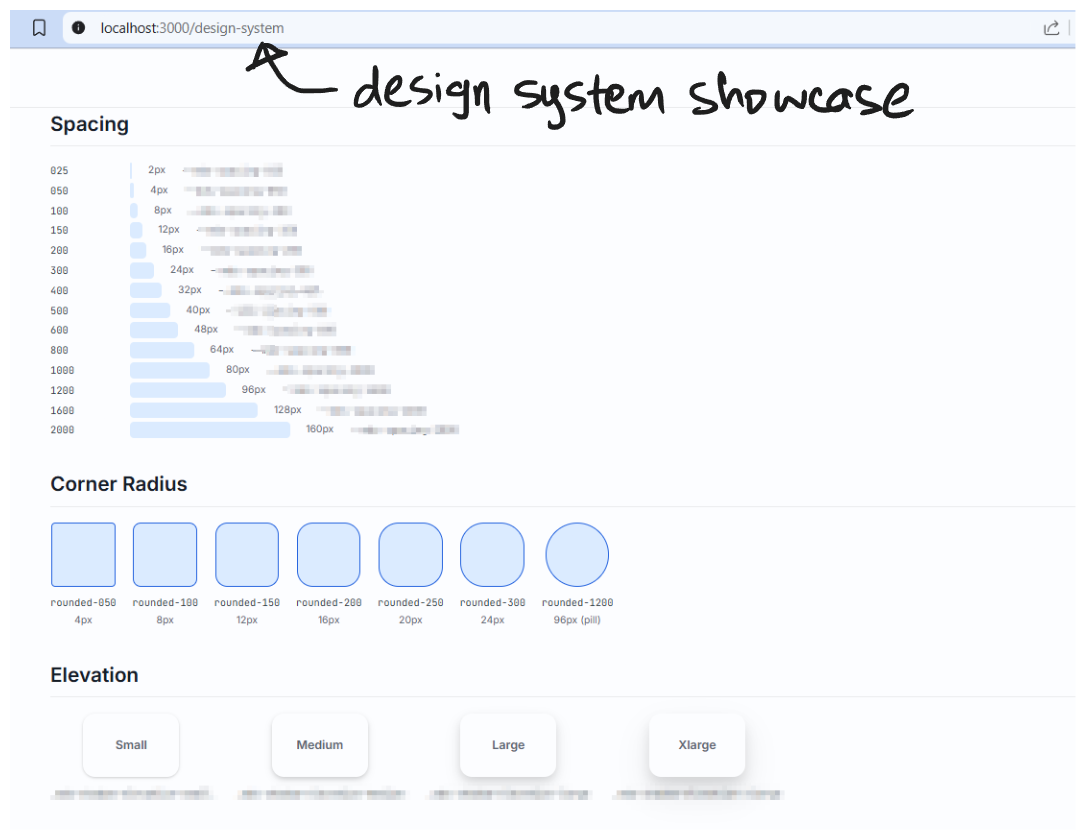
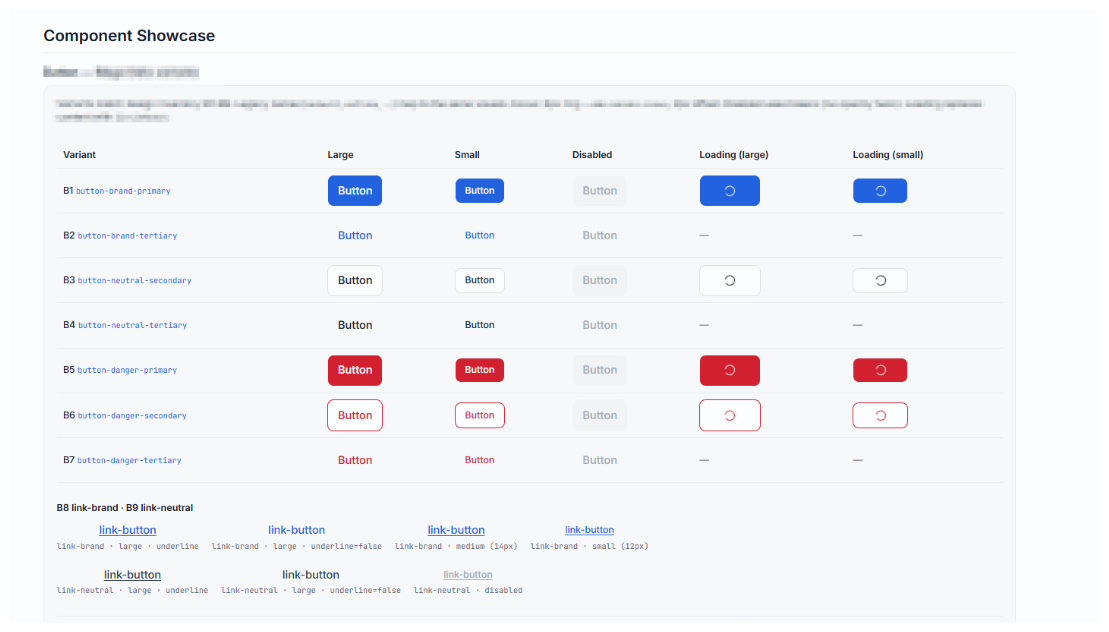
It does two jobs. First, it’s a reference for Cursor. When the showcase exists, the model can see what’s already in the system. It’s less likely to generate a new button variant when the existing ones are visible. Second, in the absence of a published DS, the showcase functions as a lightweight Storybook, the component reference that engineers would otherwise have nowhere to find.
This is a bridge arrangement. When the DS has real coverage, the showcase retires.
💡The gap this setup covers: 1) visual accuracy is high, 2) token accuracy is high, and 3) the visual language reads as your product. The only real shortfall is 4) component behaviour - and that's the one thing the showcase can explicitly flag rather than silently approximate. Three of four things right, with the fourth documented. That's a legitimate interim handoff.
Stage two: when the DS is ready
In the Next.js playground the component API is approximate, the behaviour is shadcn's, and the handoff clarity is moderately good. That's an acceptable trade-off when the design system doesn't exist yet.
So if the design system has around 70–80% component coverage and enough to cover what most prototypes actually need - a second playground makes sense. With your design system ready and published as a package - the playground is straightforward - design system installed as a dependency.
You build screens using real components, the actual props, the actual token usage. No approximations. An engineer looking at this isn't translating from shadcn. They're looking at the real thing. That's what makes it a genuine handoff artefact.
Here's how the two compare:
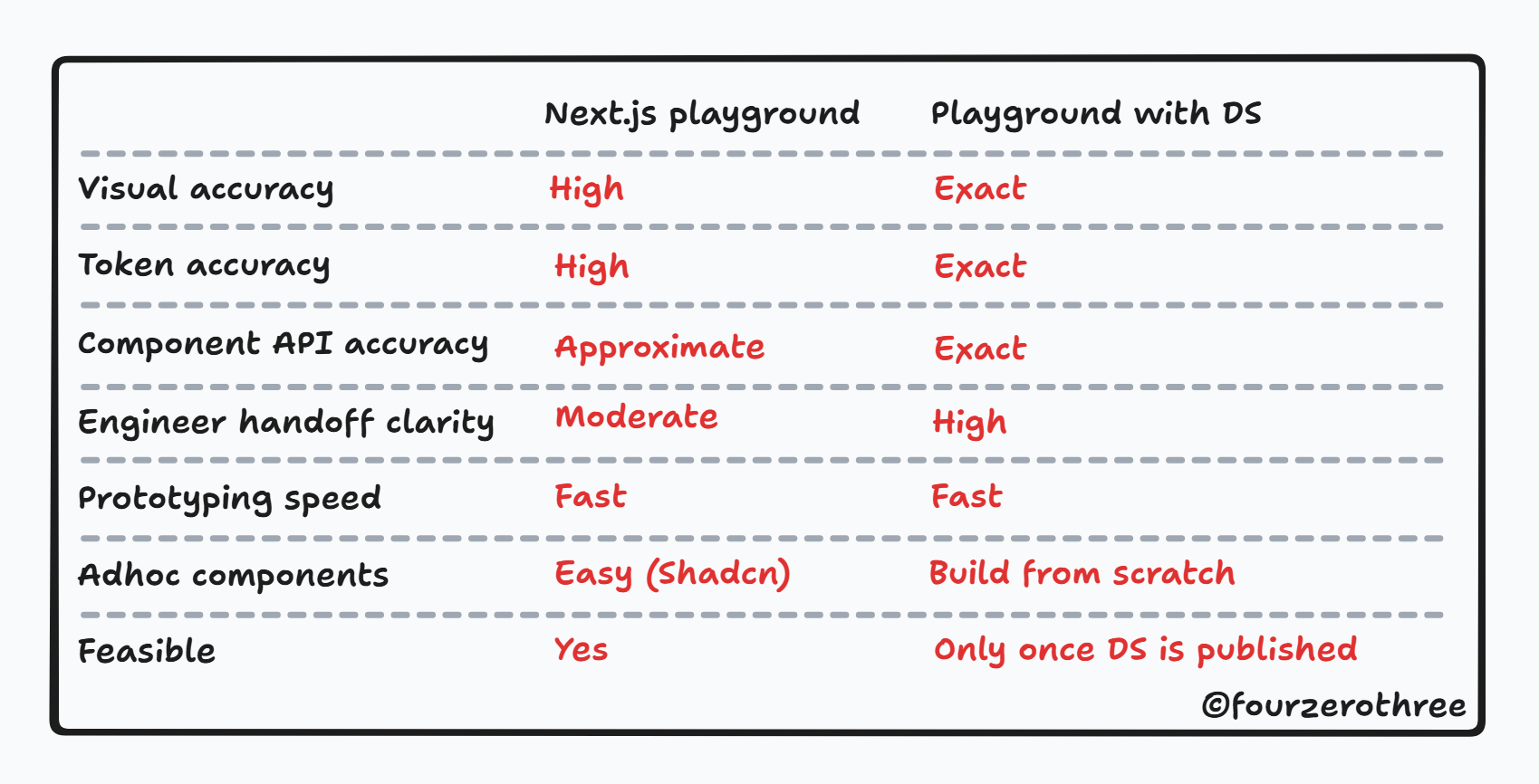
The Next.js playground is a great starting point for products with a design system that is in progress, but the second is literally the spec.
The pipeline that connects them
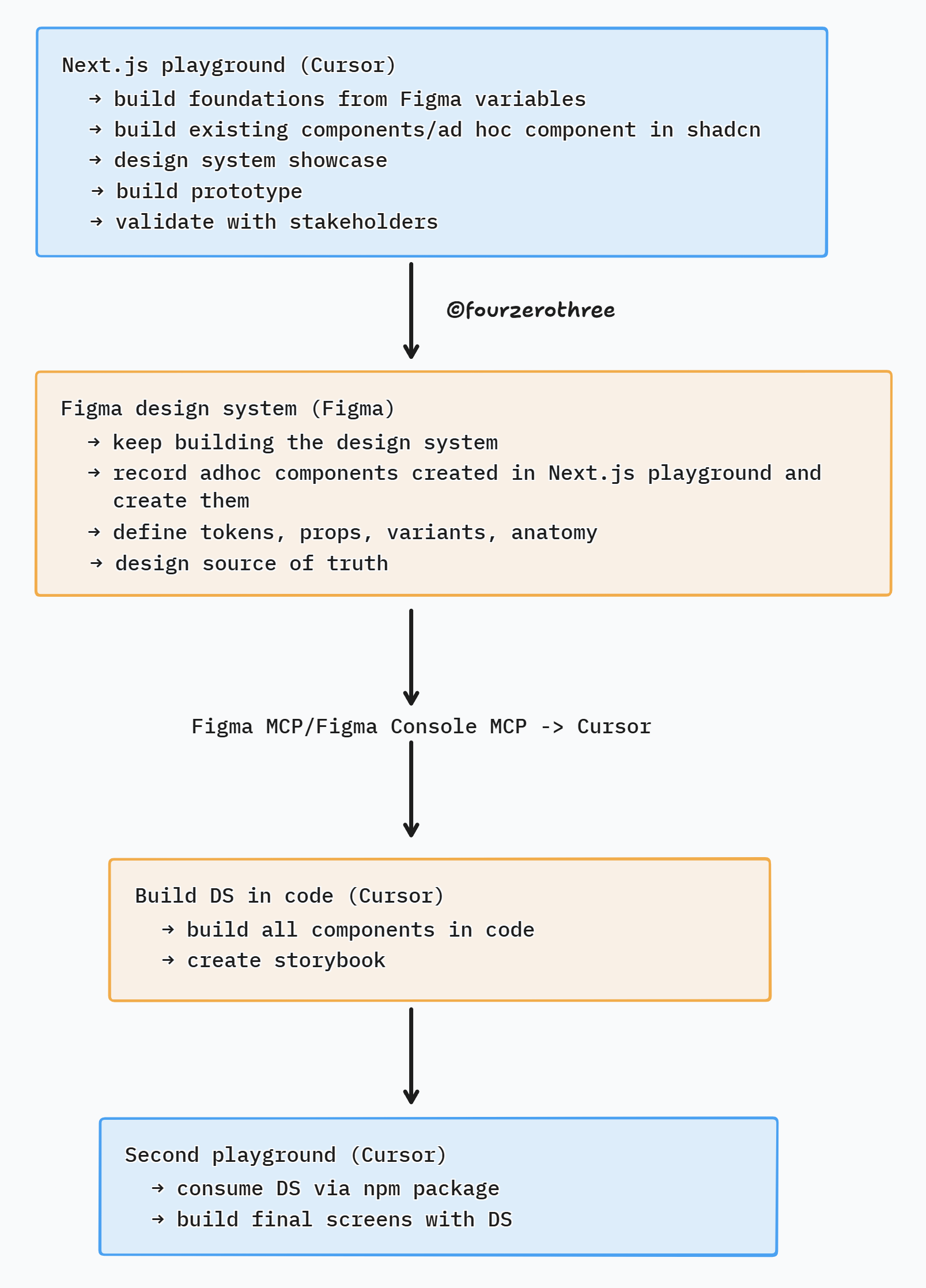
Before anything goes into the DS, it needs to go through Figma - proper token annotation, component anatomy, prop decisions documented. If you skip that step, you end up with a DS component that nobody can explain.
Closing thoughts
The Next.js playground is an experiment and its a working hypothesis. Screens come out looking genuinely production-close (with some effort and clean up, of course). Also, the design system showcase is only as useful as the discipline you bring to keeping it updated.
But here's what I can say with some confidence: the output is meaningfully different when the model has a real system to work within.
Whether "AI made this" or "I made this with AI" boils down to the playground infrastructure. Whether this eventually replaces the Figma-first workflow entirely, I don't know. Maybe? I am excited, and this is genuinely showing promise.